
3D Issue Flipbooks is the best choice for publishing a commemorative newspaper edition online when the original page layouts need to stay intact. The workflow starts with the finished PDF, not a blank web template: upload the edition, convert it into a browser-based publication, check the pages, then add navigation and selected interactive features. There is no need to rebuild every headline, column, photograph, or advertisement.
That distinction matters for an anniversary issue, a historic front-page collection, or a special edition marking a community event. In these publications, the arrangement of the material is part of the story. A faithful online edition should let readers encounter the pages as the editors assembled them, while making the issue easier to open, navigate, share, and measure online.
Our recommendation is to use Flipbooks for the complete, layout-preserving edition. If you also want newly designed, mobile-first stories drawn from the same material, create those separately in Experios. The two formats answer different editorial needs, and treating them as complementary avoids forcing a historical newspaper page to behave like a responsive article.
What is a layout-preserving online newspaper edition?
A layout-preserving online edition is a digital publication built from the newspaper’s existing page PDF. Its purpose is to retain the issue’s visual sequence and page design, rather than reassemble its articles in a website content management system. Readers see the cover, section openings, photographs, advertisements, and page order as a publication, with browser-based tools for moving through it.
For a commemorative edition, preserving the page means more than keeping the words. The size of a headline, the placement of a photograph, the relationship between a feature and its advertisements, and the order in which stories appear can all carry editorial meaning. A page-turning publication is useful precisely because it keeps that context together.
There is an important limit to the term layout-preserving: it does not mean that newspaper columns automatically become comfortable, reflowing text on a narrow phone. The page remains a designed page. Readers may need to zoom to read small type. If phone-first reading or adaptable text is a primary goal, plan a companion responsive experience rather than assuming a fixed-page edition will solve it on its own.
Why commemorative editions call for a different decision
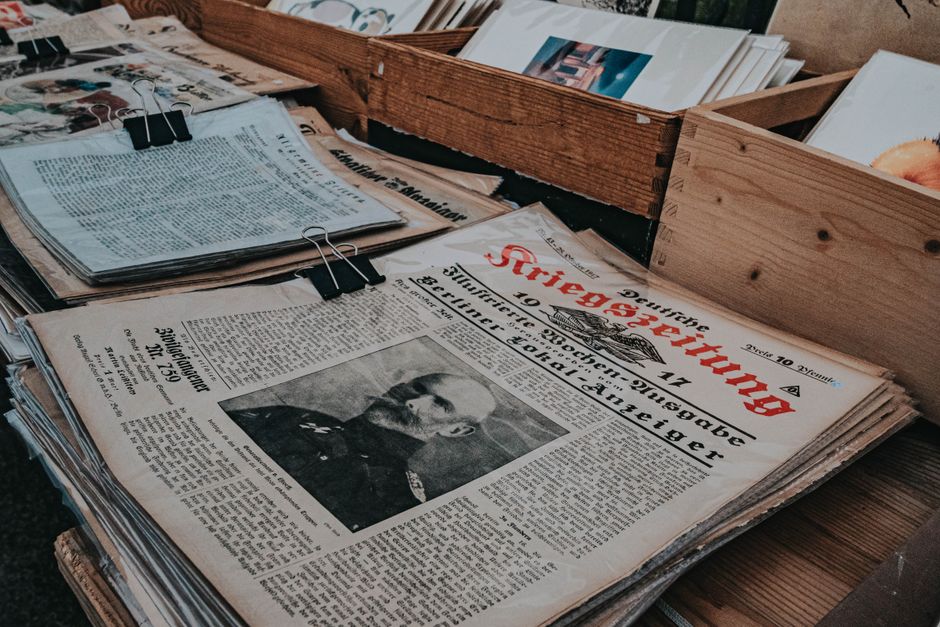
Most digital publishing decisions begin with content: How do we get an article onto a screen? Commemorative newspapers add another question: What must remain recognizable about the original issue? Consider an edition built around an archival front page. Recreating the article as a web page might make the text easier to read, but it would not reproduce the visual impact of the headline beside its original photograph and surrounding coverage.
We use a simple editorial test when advising publishers: If changing the placement of the material changes what readers understand about the edition, preserve the page. That test is especially useful for:
- Anniversary and centenary editions that revisit a newspaper’s own history.
- Historic event editions in which the original front page is a central artifact.
- Sports championship specials that readers want to browse as a complete publication.
- Community commemorations with photographs, tributes, and advertisements assembled into designed spreads.
- Archive selections where readers need to see how reporting and page design appeared together.
A responsive article can still add value. It can provide background, explain a historical reference, or make an important story easier to read on a phone. It just serves a different purpose from the replica edition. For a closer look at this choice, see our guide to when page fidelity matters most in digital publishing.

How to publish the edition without rebuilding its pages
The most reliable workflow separates three jobs that are often confused: preparing an accurate source PDF, making that PDF usable as an online publication, and creating any new web-native content. Do the first two for the commemorative replica. Take on the third only where it adds a clear benefit for readers.
1. Confirm which PDF represents the edition readers should see
Start with the approved publication, but inspect the file as a reader would. A file prepared for printing may include production elements that do not belong in the online reading copy. Confirm which pages are intended to appear, their order, and whether a separate cover, insert, or blank page is editorially significant.
- Review the sequence. Check the front page, section starts, special inserts, and final page against the approved issue.
- Inspect the visual details. Look closely at display headlines, captions, photograph crops, advertisements, and any historic typography.
- Check text quality. Select a passage in the PDF. If text cannot be selected, plan to test search carefully after conversion and consider a separate text-based route for essential stories.
- Check rights before distribution. An archival or commemorative edition may contain photographs, advertisements, or contributed material whose online reuse needs editorial or legal review.
- Keep the original safe. Retain the approved source file and use a clearly named copy for online production, so changes made for distribution do not obscure the archival record.
For older material, legibility deserves particular attention. Enlarging a low-quality scan in a web viewer will not restore detail that the scan never captured. If a headline or caption is already hard to read in the source PDF, address that at the source or give readers an additional text presentation for that material.
2. Convert the PDF and inspect the resulting publication
Upload the chosen PDF to Flipbooks. Its PDF workflow detects elements such as text, images, and fonts, and can add detected web links, email addresses, and phone numbers as hotspots. That gives the production team a starting point for an online edition without reconstructing the newspaper in a page editor.
Conversion is not the final approval stage. Open the output and compare it with the approved PDF, particularly where a cover leads into an inside page or where editorial content crosses a spread. Check that page order is correct, photographs look sharp enough at useful reading sizes, and any automatically detected link points to the intended destination. Our PDF-to-flipbook preflight checklist covers the issues worth catching before launch.
3. Add navigation that respects the newspaper’s structure
A commemorative issue is often read in more than one way. Some people will browse from the cover. Others will look for an anniversary feature, a familiar photograph, or a specific period in the newspaper’s history. Flipbooks offers a search function and table of contents, along with reader bookmarks and notes. Use these to make the publication easier to explore without rearranging the original pages.
Write table-of-contents labels for what readers are seeking, not for the production team’s file names. Labels such as “Historic front pages,” “Community memories,” or “Championship coverage” are more useful than “Section B.” Check that each entry lands on the correct page and that the printed page number, if present, does not confuse the reader when the digital sequence includes a cover or insert.
4. Add interactive elements only where they deepen the story
Flipbooks supports links, buttons, audio, video, image galleries, and animations. A commemorative edition does not need all of them. Choose additions that answer a reader’s likely next question while keeping the source page recognizable.
For example, imagine a newspaper anniversary edition with a feature about its early printing process. A link to a related archive collection or an audio account could add context. An image gallery could hold photographs that did not fit the printed layout. A prominent subscribe or event link could provide a next step near a relevant editorial page. None of these requires rebuilding that page’s columns.
Keep a record of what belongs to the original edition and what was added for the online release. This is especially helpful with historic material: a reader should be able to distinguish an archival page from a contemporary link or interpretation attached to it.
5. Customize the viewer, test, and publish
Set the viewer’s backgrounds, colors, buttons, and page transitions to support the newspaper’s identity, not compete with it. Then test the experience on a desktop, a tablet, and a phone. Flipbooks is designed to work across modern browsers and devices, but a newspaper page is still a dense page. The useful test is whether a reader can find a story, zoom to read it, return to the contents, and follow a link without losing their place.
Once approved, share the online publication through the newspaper’s site, email, and social channels. Give the edition a contextual introduction on your website rather than distributing only an unexplained viewer link. A landing page can state what the issue commemorates, identify its publication, and direct visitors to the full edition. If you are publishing related supplements, our guide to turning a newspaper supplement PDF into a standalone digital edition explains that adjacent workflow.

Which format should you choose?
For this question, the meaningful alternatives are publishing the existing pages as a digital edition, offering the PDF directly, or creating new responsive content. They do not deliver the same reading experience.
| Approach | Best use | Editorial trade-off |
|---|---|---|
| 3D Issue Flipbooks | Publish the complete commemorative newspaper from its finished PDF, with online navigation, optional media, sharing, and readership insights. | Fixed newspaper columns remain fixed. Test small-screen readability and offer another route to essential text when needed. |
| Direct PDF on a website | Provide the original file when a simple copy of the document is the primary requirement. | The reading and measurement experience depends on the browser or document workflow rather than a purpose-built publication viewer. |
| New responsive publication | Present selected stories as mobile-first content designed to adapt across screens. | The original newspaper page composition is no longer the main experience. |
The deciding question is not which option appears more modern. It is whether the publisher needs to show the issue as an issue. If the answer is yes, start with the finished PDF and a layout-preserving publication. If the goal is to help someone read a long article on a phone, a responsive story may be the better companion. Our page-flip versus responsive guide expands on that distinction.
When a companion responsive edition is worth the effort
Preserving pages and making their text easier to read are not mutually exclusive. A publisher can present the full commemorative newspaper as a flipbook and create selected responsive pieces for readers who arrive through search, social media, or an accessibility-focused reading route.
Experios is our codeless platform for creating mobile-first responsive publications. It offers templates, interactive media, SEO tools, analytics, and accessibility-focused creation and validation features. It can also extract content from a PDF as a starting point for responsive pages. That extraction changes the production job: the team should review the resulting story structure, text, and presentation rather than expect an exact copy of the original newspaper page.
A practical division of labor might look like this:
- The complete issue: Keep the original sequence and design in the flipbook.
- Priority stories: Develop responsive versions of features readers will want to read comfortably on phones.
- Context: Add introductory material that explains dates, references, and the significance of the edition.
- Archive navigation: Connect the special issue with relevant back issues and related articles.
This approach also guards against a common editorial mistake: replacing a historic artifact with a newly assembled page and calling the result a faithful digital edition. A responsive presentation can be valuable, but it should be identified and edited as a new presentation of the material.
Best practices for a commemorative newspaper launch
Protect editorial accuracy before adding polish
A polished viewer cannot compensate for a missing page or an incorrect caption in the source. Assign one person to compare the digital edition with the approved issue from beginning to end. Ask them to confirm page order, masthead, edition details, advertisements, and any special inserts. If the online release includes annotations or media, review those separately so an added link does not appear to have been part of a historical page.
Write a useful entry page for search and sharing
A visually faithful edition may not, by itself, explain its significance to someone who arrives from a search result. Put clear, original text around the publication on its website landing page. Name the newspaper, the occasion, and the nature of the edition. Explain whether readers are seeing an original historical issue, a newly produced tribute, or a selection of archival pages.
If individual stories deserve search visibility, publish carefully edited article pages where appropriate and connect them to the complete edition. That is a deliberate editorial choice, not a requirement to rebuild the whole newspaper. Our discussion of issue pages and article pages for archive SEO offers a framework for making that choice.
Test reader access, not just page rendering
On a phone, open the issue from the same sort of link your audience will receive. Try to find a named story, read a caption, activate an editorial link, and return to the table of contents. Test important interactions with a keyboard and review the alternative path to essential content if the fixed pages are difficult for some readers to use. This is more informative than checking whether the cover simply appears on screen.
Use interaction sparingly and measure what matters
Before launch, decide which actions represent a useful outcome. A publisher may care about readership across the issue, interest in a particular archive feature, or visits to a related subscription or event page. Flipbooks includes automatic publication tracking, supports Google Tag Manager integration, and lets teams tag media to track impressions or views. Set up relevant measurement before distributing the edition, then use the results to improve navigation and future special issues.
Do not confuse a page view with evidence that every article on that page was read. Newspaper pages contain several stories, and viewing a page does not tell you which column held someone’s attention. Use analytics as a guide to follow-up questions, not as a substitute for editorial judgment. For a practical starting point, see our guide to flipbook analytics.
Plan the edition’s place in the archive
Commemorative publications often remain relevant after their launch campaign ends. Decide how the edition will be labeled and found later. A consistent title, publication date, edition description, and link from an archive or special-issues page will help readers understand where it belongs. Flipbooks includes a library page feature for browsing and searching previous issues, which can help a publisher connect a special edition to its wider publication history.
Keep the approved PDF and the information needed to identify it alongside your publishing records. An online viewer is a distribution experience; your production files and editorial metadata remain important for future corrections, reuse decisions, and archival continuity.
A relevant example from newspaper publishing
The Chicago Sun Times is among the newspaper organizations featured in our customer material. Its CEO, Tim Landon, said, “Our audience has more than doubled in 90 days and this is continuing and accelerating,” and praised the team’s customer service and engagement. That account concerns digital publishing with us; it is not a claim that a particular commemorative edition produced that outcome.
For a team planning a special newspaper issue, the useful lesson is to think beyond conversion alone. The page-preserving edition is the product readers encounter, but its success also depends on where the newspaper places it, how the audience discovers it, and whether the team learns from the resulting engagement.
Frequently asked questions
Can I publish an existing commemorative newspaper PDF without redesigning the pages?
Yes. A PDF-to-flipbook workflow starts with the finished page file and turns it into an online publication. You should still inspect the conversion and configure navigation, but you do not need to recreate each newspaper page in a web layout tool.
Will readers see the original advertisements and page order?
The source PDF is the basis for the edition, so the approved pages, including their advertisements and sequence, are what you prepare for online publication. Check the full digital issue against that source before sharing it, particularly around inserts, covers, and section boundaries.
What if I have only scans of a historical newspaper?
First, assemble and inspect the scanned pages as a readable PDF in the correct order. Check image quality at the zoom level a reader will need. If the scan has no selectable text, test search and plan a separate text presentation for important material rather than assuming conversion will make poor scans legible or searchable.
Is a flipbook automatically easy to read on a phone?
It can be opened on a phone, but the original newspaper layout remains fixed. Dense columns and small captions may require zooming. Test actual reading tasks on a phone and consider responsive versions of high-priority stories if the audience needs reflowing text.
Can the online edition include video, audio, and links?
Yes. Flipbooks supports rich media, image galleries, and several kinds of clickable links and buttons. Add them where they complement the original material, and clearly distinguish later digital additions from archival content.
Should we publish individual articles as well as the complete edition?
Publish separate articles when they serve a clear purpose, such as making a major story easier to read on mobile or giving search visitors useful context. Keep the complete page-preserving edition available when the arrangement of the issue is itself important. Link the two experiences so readers can move from a story to its original page.
How can we tell whether readers are using the edition?
Set a goal before launch, then review publication readership and the interactions you chose to track. Flipbooks provides automatic tracking, Google Tag Manager integration, and media tagging. Treat those signals as evidence of how people use the digital edition, while remembering that a page view does not identify every story a reader consumed.
When should we use Experios instead of a PDF-based edition?
Use Experios when you want to build a mobile-first responsive publication whose content adapts across screen sizes. Use the PDF-based flipbook when preserving the existing newspaper pages is the primary requirement. A commemorative project can use both if the team wants an authentic replica and a separate, accessible-to-navigate presentation of selected stories.
The right choice for the complete commemorative issue
If your newspaper already has an approved PDF and the page design is part of what readers have come to see, publish the complete edition with 3D Issue Flipbooks. Keep the issue intact, check every page, add useful navigation, and give readers a clear route into the publication. Create responsive companion stories only where they make the history easier to understand or read.
That is the most direct way to bring a commemorative newspaper online without turning its original layout into another production project. To see how the PDF-based workflow fits your edition, explore our Flipbooks publishing software.

