

You’ll end up with your flipbooks reachable at an address on your own domain.
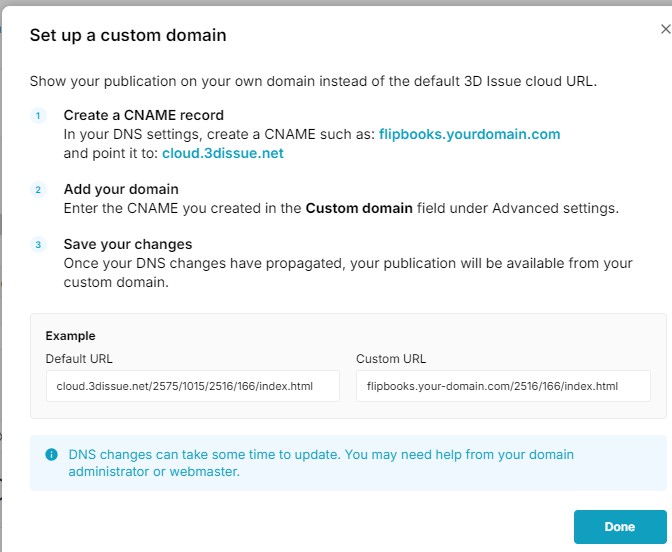
By default a cloud-hosted flipbook has an address like cloud.3dissue.net/2575/1015/2516/166/index.html. Masked, the same publication is also served from flipbooks.your-domain.com/2516/166/index.html, which is the form the product’s own guide uses.
You’ll need
- Access to the domain’s DNS records. The product calls this “your domain administrator”; it is usually your webmaster or hosting provider.
- The brand the publications use. The custom domain is set on a brand, so every publication carrying that brand is served from it.
- The hostname you intend to use, for example
flipbooks.yourdomain.com.
Create the CNAME record
In your DNS settings, create a CNAME record for the hostname you chose and point it at cloud.3dissue.net. Use a CNAME rather than an A record, so the publication keeps working if the server address changes.
The Cloud Masking Test page checks the record before you touch the brand: enter the hostname, click Test CNAME, and it reports where the name currently points. Its own failure message names both accepted targets, cloud.3dissue.com and cloud.3dissue.net, and notes that propagation can take an hour.
Enter the domain on the brand
- Open the dashboard, choose Brands from the user menu, and set the product selector at the top to Replicate.
- Pick the brand the publications use, then open Advanced beneath Brand details. It is collapsed until you click it.
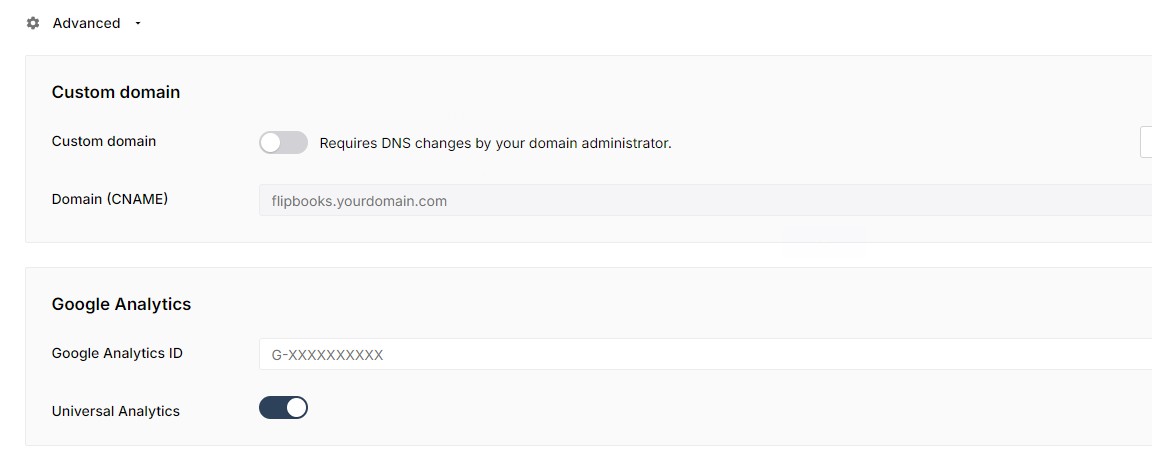
- Switch Custom domain on. The row carries the note “Requires DNS changes by your domain administrator.”
- Type the hostname into Domain (CNAME), for example
flipbooks.yourdomain.com. - Choose Save changes at the top right. The screen confirms with “Brand changes saved”.
The View guide button beside the toggle opens the product’s own three-step guide, with an example of the default and custom addresses. It is worth reading even if you have done this before, because it states the CNAME target the current build expects.
What to expect
- DNS changes take time to propagate. The product says so in the guide and recommends your domain administrator or webmaster for the DNS side.
- The address applies to the brand, so publications carrying that brand are served from it.
- Nothing in the product’s guide says whether a certificate is issued automatically, or whether an email follows when the domain takes effect; confirm both with support before relying on either.
If it doesn’t work
- The domain still shows the cloud address. Check the record is a CNAME pointing at
cloud.3dissue.net, that it has propagated, and that Custom domain is switched on for the brand with Save changes applied. - An older article quotes error #101, #102 or #103. Those codes came from the previous interface and are explained in Why does domain masking fail?.
- Nothing resolves at all. Ask the domain administrator to confirm the record is published rather than saved as a draft, then retry.