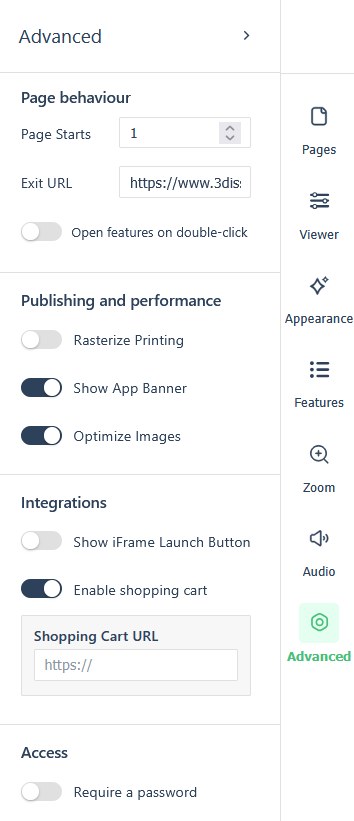
The settings panel’s Advanced section covers page behaviour, publishing and performance, integrations, and access. Open the panel from the icon rail on the right edge of the Replicate canvas (see The reader experience: what readers see & how they navigate for the rail and the full settings tour).
Page behaviour
Where a cell is blank, the setting has no fixed default.
| Field | Default | Values | What it changes |
|---|---|---|---|
| Page Starts | 1 | A page number | The page the reader opens on. |
| Exit URL | Empty | An address | Where the reader is sent on leaving the flipbook. |
| Open features on double-click | Off | On, Off | A double-click on the page opens the features panel. |
Publishing and performance
| Field | Default | Values | What it changes |
|---|---|---|---|
| Rasterize Printing | Off | On, Off | |
| Show App Banner | On | On, Off | |
| Optimize Images | On | On, Off |
Integrations
| Field | Default | Values | What it changes |
|---|---|---|---|
| Show iFrame Launch Button | Off | On, Off | Adds the launch button used for embedding (see Embedding a publication on your own site). |
| Enable shopping cart | Off | On, Off | Adds a Shopping Cart URL field below it for the cart destination. |
Access
| Field | Default | Values | What it changes |
|---|---|---|---|
| Require a password | Off | On, Off |
For a reader login rather than a single shared password, the brand’s User Login options are the route: Can I password-protect a flipbook (reader login)? covers them.