

This message appears if your computer is not able to communicate with the servers. For example, if you are using a Proxy or are behind a strict Firewall.
Configuring 3D Issue for Proxies
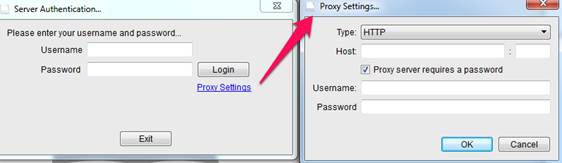
At the login stage you should see an option to add your proxy settings, as show in the image below.
If you are unsure of your proxy details then you will need to contact your IT team as they should be able to provide them.
Firewalls or corporate networks
If you think your company network is preventing this from working, ask your IT team to add the below hostnames as exceptions to your network firewall for port 80 and port 443
Once you have made these changes you then should be able to access the software.
- Pressjack.com
- 3dissue.com
- 3dissue.net
- 3dis.su
- Apis.3dissue.com
- Cloud.3dissue.com
- Registerserver.net
- Stats.3dissue.com
If the message appears after you have bought the software, the trial state is a licensing question rather than a network one: Why does it still say trial version after purchase?.