Skip to content

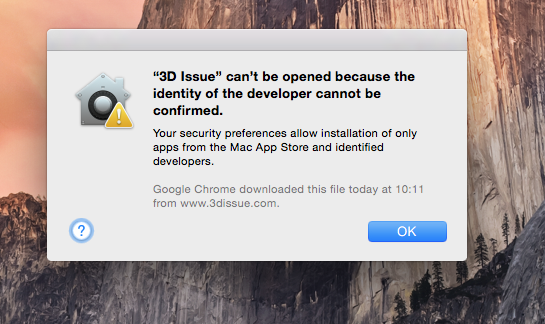
3D Issue can’t be opened because the identity of the developer cannot be confirmed.

Flipbooks DesktopHow-to1 min read13 views

Tagged

The macOS dialog saying "3D Issue" can't be opened because the identity of the developer cannot be confirmed, with OK beneath.

This is due to current security preferences in MacOS.

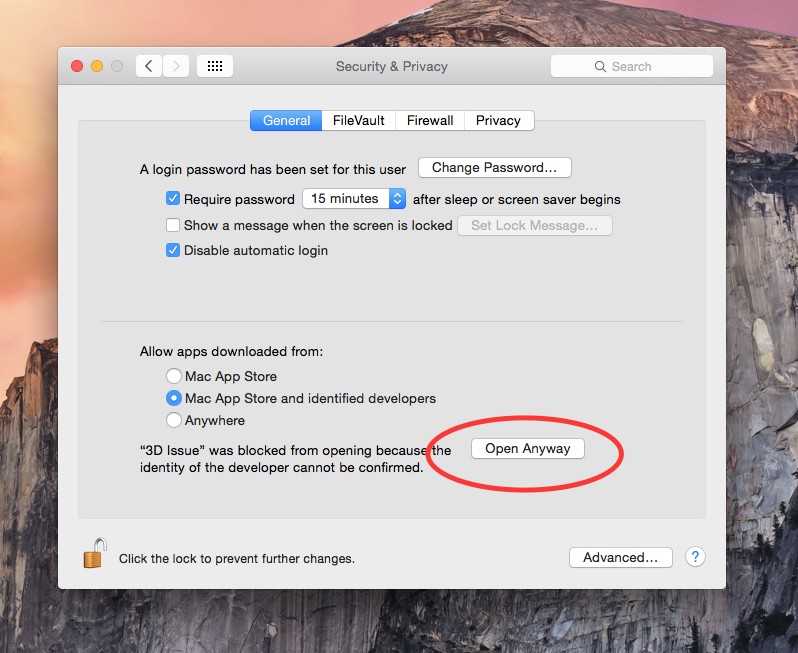
  1. Navigate to your Security & Privacy settings by clicking the Apple menu and then Preferences.
  2. In the general tab of Security & Privacy, click Open Anyway as illustrated in the screenshot below.The Security & Privacy General pane: the Allow apps downloaded from options, and the Open Anyway button circled.
  3. You can also avoid this warning by setting your downloaded apps setting to the App Store and identified developers option.