

The software can be installed on PCs or Macs, the number of installations you have is the number of machines the software can be installed on at any one time. Whether each installation signs in with its own details is Can each install have its own login details?.
PC
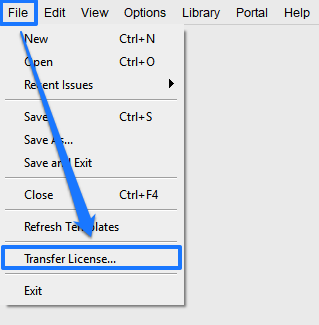
You can always transfer your license from one PC to another at any time by clicking File > Transfer License from the top menu of the software, this will deactivate your current installation of the software and allow you to then activate the software on another PC using the same download and installation instructions as before.
If you no longer have access to the software all you need to do is send the support team a quick email at support@3dissue.com who can deactivate the current installation of the software and send you new download and installation instructions to activate the software on another PC.
Mac
If you need to transfer your license from one Mac to another all you need to do is send the support team a quick email at support@3dissue.com who can deactivate the current installation of the software and send you new download and installation instructions to activate the software on another Mac.
You can even transfer your license from your PC to a Mac or vice versa by contacting the support team, transferring your license only takes a couple of minutes at the 3D Issue end so contact support to arrange it.