

You’ll end up with page numbers that start where you choose, so the cover can carry none.
You’ll need
- The project open, with its page order settled in the Content tab.
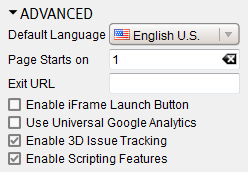
- Open the Design tab and its Advanced section.
- Change the number in the field beside Page Starts on — the online flipbook’s numbering then starts on that page.
If it doesn’t work
- The published copy still counts from the cover. Build and upload the flipbook again so the new starting page reaches the online copy — see Can I overwrite an existing flipbook?.